 Hibernot
For MacBooks · Claude & Codex
Awake in your bag.
Asleep at 42 °C.
Keeps your MacBook awake with the lid closed. Stops when Claude or Codex finish. Stops before 42 °C. No password.
Then €9 once · macOS 14+ · Apple silicon & Intel
14:03
Close the lid.
Claude or Codex keeps working. A small guard checks time, heat and charge every 5 seconds, even if you quit the app.
14:05
Into the bag.
On the train, on your phone’s hotspot. Claude: still running.
14:21 · thermal view
A closed bag holds heat.
Hibernot reads the battery every 5 seconds. At your limit, 42 °C unless you change it, the Mac goes to sleep.
inside
Degrees from the battery sensor.
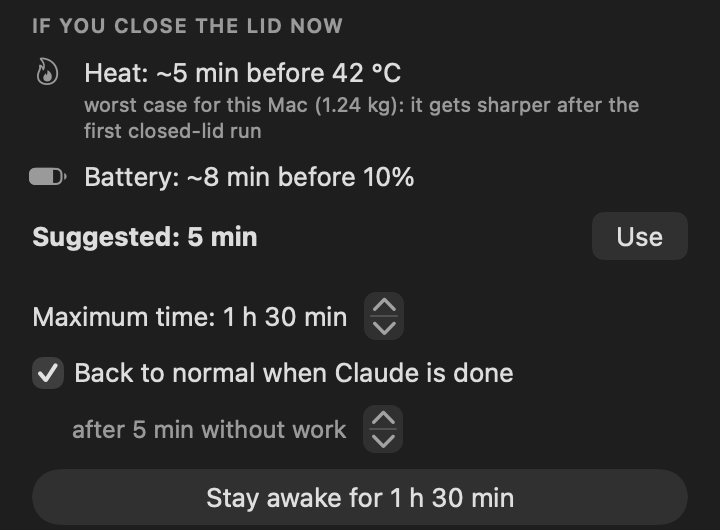
The sensor in the battery cells, not the room and not macOS’s “serious” state. Before you close the lid, the panel shows the minutes left before your limit.
14:28
Claude finished. Your Mac is going to sleep.
Normal sleep 5 minutes after the work stops, or at 42 °C, whichever comes first. Your phone tells you why.
Try it
The real panel, in your browser.
Press “Stay awake” and watch a whole run in half a minute.
Last time: back to normal at 14:28, Claude finished.
If you close the lid now, the Mac goes to sleep.
You can close the lid: it stays awake until 15:32 at the latest.
Now
Claude
If you close the lid now
Claude's estimate with room to spare; back to normal 5 min after it's done
Keep the Mac online (Wi-Fi, or your phone's hotspot when you leave): without a network Claude stops even if the Mac stays awake.
Heat, in real degrees
21 closed-lid runs. Warmest battery reading: 34.2 °C.
Other keep-awake apps stop on battery percentage or on macOS’s thermal state, or not at all. Hibernot reads the battery temperature every 5 seconds and stops at the limit you set (42 °C unless you change it). Before you close the lid, it shows the minutes left. Until it has measured your Mac, it assumes the worst case.
The 34.2 °C is the first reading after the lid closed, on 17 November. After 38 minutes the battery read 29.1 °C. The other 20 runs stayed at or below 30.8 °C.
Claude’s model runs in the cloud, so the Mac mostly waits. On battery, these runs drew 0.5 to 8.0 W on average. Local work like a video export heats faster, and Hibernot shows it before you close the lid.
The first estimate assumes no heat leaves the bag at all, scaled to your MacBook’s weight. After each closed-lid run of 6 minutes or more it uses the worst of your last five.
Why not caffeinate?
caffeinate keeps a Mac awake. Until you close the lid.
On a MacBook running on battery, closing the lid means sleep, whatever your terminal says. And the command that does stop it never undoes itself.
caffeinate -i claude
# lid open          ✓ awake
# lid closed, battery ✗ macOS sleeps
# 40 minutes later  ✗ still on step 3
Fine on a desk. Not in a bag.
sudo pmset -a disablesleep 1
# lid closed        ✓ awake
# password          ! every time
# when it's done    ✗ stays on until
                      you set it to 0
Works. Then it stays awake in your bag.
Hibernot  · Stay awake for 45 min
# lid closed, battery ✓ awake
# password          ✓ none
# when Claude is done ✓ back to sleep
# 42 °C · 10% · 4 h  ✓ stops itself
Stops when Claude or Codex finish. Stops before 42 °C.
Notifications
Your Mac is in the bag. Your phone isn’t.
On iPhone or Android, with no app to download and no account: point your phone’s camera at the code in Hibernot’s settings and follow the page that opens. On iPhone you add it to the Home Screen first (iOS 16.4 or later); on Android it takes one tap.
- Claude needs your permission. Answer from the Claude app on your phone, or open the Mac.
- Battery at 40.1 °C. Sent 2 °C before your limit.
- Claude finished. Or Codex, a download, the time limit, heat or charge. Then the minutes with the lid closed and the peak temperature.
- Your chats stay out of it. Notifications travel encrypted from your Mac to your phone, through Apple’s or Google’s own notification service. Only your phone can open them.
The guard
It goes back to sleep at the first of these.
A separate guard checks every 5 seconds, even if the app quits or crashes. Restart the Mac and normal sleep is back anyway.
No password, nothing installed in the system.
Hibernot asks macOS, as your user, not to sleep when the lid closes, and keeps idle sleep away with macOS’s own caffeinate. Both end with the run. A password method stays in Settings as a fallback.
It sees Claude Code, the Claude app and Codex.
Claude Code through its hooks (one click to connect, one to undo, your settings file restored exactly). The Claude desktop app and Codex, command line or app, from their network activity: it counts bytes, it never reads them.
Compare
Lots of apps keep a closed Mac awake.
The free tool built into macOS and the paid apps closest to Hibernot. Some do more: Vigil follows 13 agents, Clamshell has dozens of modules. Hibernot differs on heat: it stops at a battery temperature you choose and shows the minutes left before it.
| caffeinatebuilt into macOS | AmphetamineMac App Store | Clamshellclamshell.dev | Vigilappsbymo.app/ |
Hibernotthis app | |
|---|---|---|---|---|---|
| Price | Free | Free | $9.99 once (3 Macs $19.99), 7-day trial | 7-day trial, then paid; launch offer $5 for 3 Macs | €9 once for 3 Macs, 7-day trial |
| Awake with the lid closed, on battery | No | Yes, closed-display mode (on Apple silicon an optional script, installed with your admin password, keeps it holding when you plug or unplug power) | Yes | Yes | Yes |
| Needs your password | No | Only for that script | No (some optional modules: a helper approved once) | Once, for a small root helper | No (fallback method: yes) |
| Heat | No | Battery % stop, no temperature | Stops on macOS thermal state (serious or critical), no degrees | Shows degrees; pauses on macOS thermal state (serious) | Stops at a battery temperature you set (36–45 °C, 42 by default), estimates the minutes before it, plus macOS thermal state |
| Knows when the AI is done | Only while the command it wraps runs | No (triggers for apps, not agents) | Yes, Claude Code and other agents, many optional modules | Yes, 13 command-line agents, Claude Code through its hooks | Yes, Claude Code (hooks), the Claude desktop app with chats and Cowork, and Codex, CLI and app (network activity) |
| Notifications on your phone | No | No | No, on the Mac | iPhone and Apple Watch, through your iCloud | iPhone and Android, no app, no account |
| Intel Macs | Yes | Yes | No, Apple silicon only | Yes, macOS 14+ | Yes, macOS 14+ |
Checked on 16 November 2026 on each product’s own pages: clamshell.dev, Vigil for Mac and Vigil Companion, Vigil’s launch thread (price), Amphetamine. Where a page doesn’t say, the table doesn’t claim it. Out of date? Write to hello@gethibernot.com. These apps are made by other independent developers, with no connection to Hibernot.
One price
€9once
VAT included where it applies. Try everything free for 7 days first, no card needed.
- Every feature, no tiers, no subscription
- Updates included
- For you, on up to 3 of your Macs
- 14-day refund, no questions asked
Checkout by Freemius, the reseller (Merchant of Record): Freemius takes the payment, handles VAT and emails your receipt and license key. Paste the key in Hibernot’s panel.
Questions
Before you close the lid.
More in the guides: caffeinate, pmset disablesleep, heat in a backpack, overnight agent runs.
Is it safe to keep a MacBook running in a backpack?
A closed bag holds heat, and heat wears a battery. Hibernot stops before 42 °C. It reads the battery temperature every 5 seconds and puts the Mac back to normal at your limit (42 °C by default, 36–45 °C), at 10% charge, when macOS reports a serious thermal state, and in any case within 4 hours.
Start with short runs. Don’t pack the Mac next to a charger or anything warm. Keep it out of the sun and out of hot cars. Apple recommends using a MacBook between 10 and 35 °C.
Will it drain my battery?
A Mac that stays awake uses battery, as it would with the lid open. Hibernot shows how many minutes you have before 10% and stops there if the Mac isn’t plugged in.
Why doesn’t it need my password?
macOS lets a normal user ask the system not to sleep when the lid closes. Hibernot does that, plus keeps idle sleep away with macOS’s own caffeinate, and undoes both at the end. Nothing is installed in the system. If the normal method doesn’t keep your Mac awake, a fallback in Settings uses pmset and asks for your password each time.
What leaves my Mac?
Nothing is sent to the developer. Hibernot connects to the internet only for:
- your license: when you activate it, the key, your Mac’s model and a code made from its hardware ID (it can’t be turned back into the ID) go to Freemius; about once a week Hibernot checks the key is still valid;
- updates: it reads a small file on this site with the latest version number;
- phone notifications, only if you turn them on: the title and a short text travel encrypted to your phone through its own notification service (Apple or Google), and only your phone can open them. When you link the phone, it leaves its notification address for your Mac on ntfy.sh, which keeps it for 12 hours at most.
To see whether the Claude app is working, Hibernot counts how many bytes it receives, on your Mac. It never reads what’s in them. Details in the .
Which agents does it see? Does it work with Codex?
Claude Code: press “Connect Claude Code” and Hibernot adds its hooks to ~/.claude/settings.json, keeping a copy of the file as it was. “Disconnect” removes them and leaves the file exactly as before. It then sees each session, whether it’s working, waiting for a permission or done, and how many steps its plan has left.
The Claude desktop app (chats and Cowork): from its network activity, without connecting anything. Codex, the command line and the app, works the same way: Hibernot sees when it’s receiving a reply and goes back to normal 5 minutes after it stops. Claude or Codex in a web browser it can’t see; for that, the maximum time applies.
Does it wait for downloads, exports and other work?
Yes. Besides Claude and Codex, Hibernot waits for the rest of your Mac’s work: a download or an upload, a video export, a build, a command left running in Terminal. When everything has stopped for 5 minutes, it goes back to normal, and your phone says who finished, like “Google Chrome finished”.
It looks only at numbers Activity Monitor shows too: CPU, network and disk for each app, plus the “download in progress” flag that Chrome, Edge, Brave and Arc give macOS. Safari and Firefox don’t give it, so with them a download that stalls for 5 minutes looks finished. macOS’s own background tasks, like Spotlight and iCloud, don’t count, and for a browser only downloads and uploads do, not a heavy tab. To wait only for Claude and Codex, turn off “Also wait for downloads, apps and commands” in Settings.
What do I need?
A MacBook with macOS 14 Sonoma or later, Apple silicon or Intel. For Claude to keep working, the Mac needs internet: Wi-Fi, or your phone’s hotspot when you leave. If the network drops, Hibernot waits up to 15 minutes, then goes back to normal and tells you why.
macOS says it can’t check Hibernot for malware
Hibernot isn’t notarized by Apple yet. Open it once from System Settings → Privacy & Security → “Open Anyway”. If that button doesn’t appear, run xattr -cr /Applications/Hibernot.app in Terminal: it only removes the “downloaded from the internet” mark from Hibernot.
How do the trial and the license work?
The trial lasts 7 days from the first launch, with every feature. After that Hibernot won’t start a new run until you add a license key, but it never leaves your Mac stuck awake: normal sleep always comes back. The key works for you on up to 3 of your Macs; you can remove it from one Mac and use it on another. Updates are included.
Can I get a refund?
Yes. Within 14 days of buying, for any reason: write to hello@gethibernot.com with your order email. The refund goes back through Freemius and your key is deactivated.
What if something goes wrong?
Press “Back to normal now” in the panel. If the app isn’t responding, run /Applications/Hibernot.app/Contents/MacOS/hibernot-lid 0 in Terminal, or restart the Mac: either way normal sleep comes back. Then write to hello@gethibernot.com.
Is Hibernot made by Anthropic?
No. Hibernot is an independent app that works with Claude Code, the Claude app and Codex. It is not affiliated with, endorsed or sponsored by Apple, Anthropic or OpenAI. “Hibernot” as in “doesn’t hibernate”.